Wise gets 7.1M visits a month from Google in the US, and almost all of them land on currency converter pages.
All 10 of its top pages are converters, like "euros to US dollars". Only 1% of its visitors search for the name Wise.
So a money app wins search with a free tool, copied once for every pair of currencies. We ran Wise through our whole SEO toolkit to see how it works.
Here are 9 lessons you can copy, plus the part you can't.
Build one page for every pair
We started with our Organic Traffic Checker. It estimates a site's organic traffic, meaning the people who find it on Google without ads.
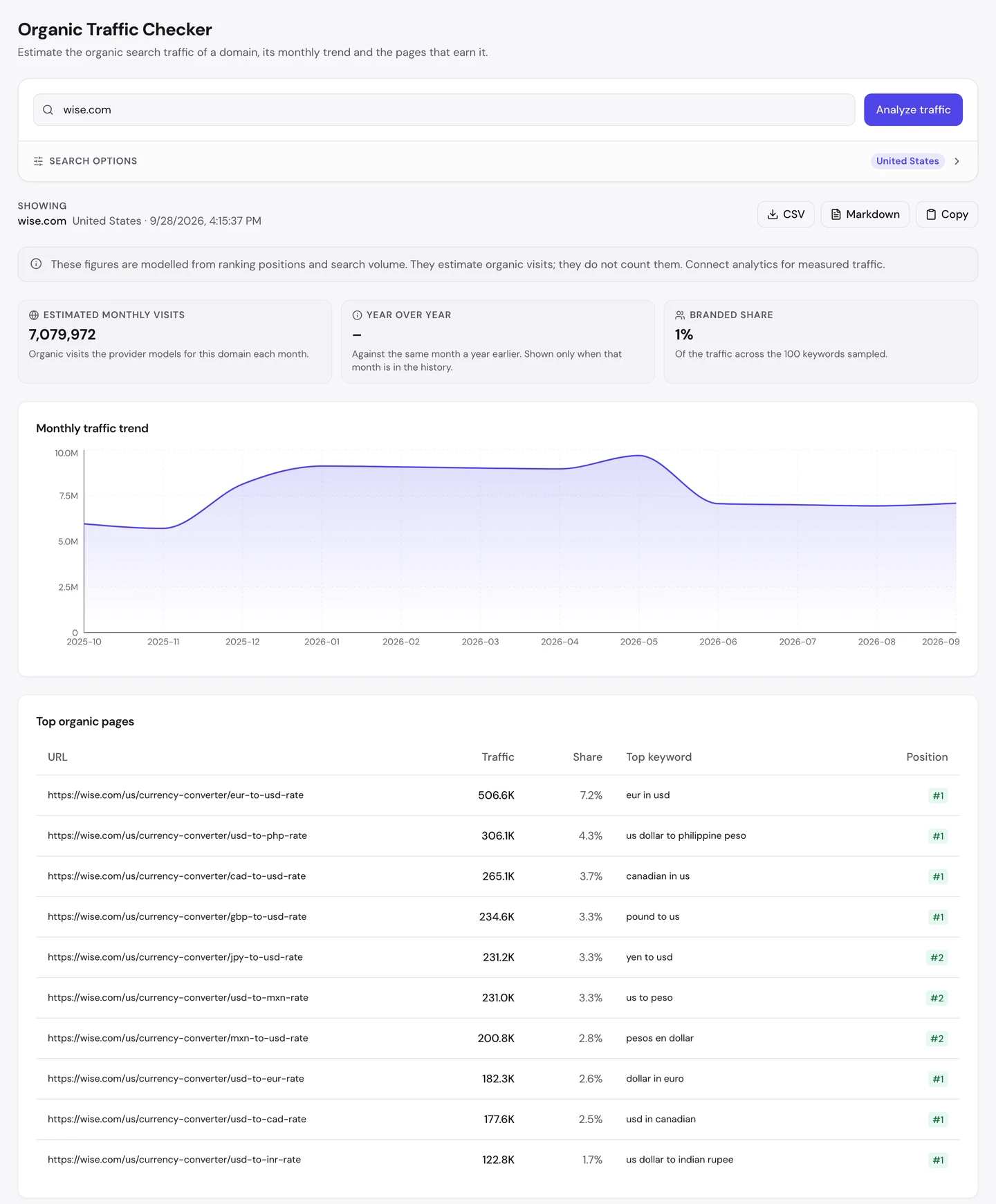
For Wise, that's about 7.1M visits a month in the US. The biggest page, euros to US dollars, brings in about 7% of them on its own.
The next 9 pages follow the same pattern: dollars to pesos, Canadian dollars to US dollars, pounds, yen. Each pair of currencies gets its own page.
That's programmatic SEO, which means building lots of pages from one template and a list of data.
A sitemap is the file that lists a site's pages for Google. When we counted Wise's in August, it listed nearly 4K currency pairs for each language.
Zapier, the automation app we studied on its own, built thousands of template pages too. But there, one blog post carries most of the visits.
At Wise, the template pages are the winners.
The difference is simple. Every Wise page answers a real question you might type into Google yourself.
So look at your own data. If you have a list of things people compare, price or convert, each item could be its own page.
Put the answer at the very top
Here's what the biggest page looks like.
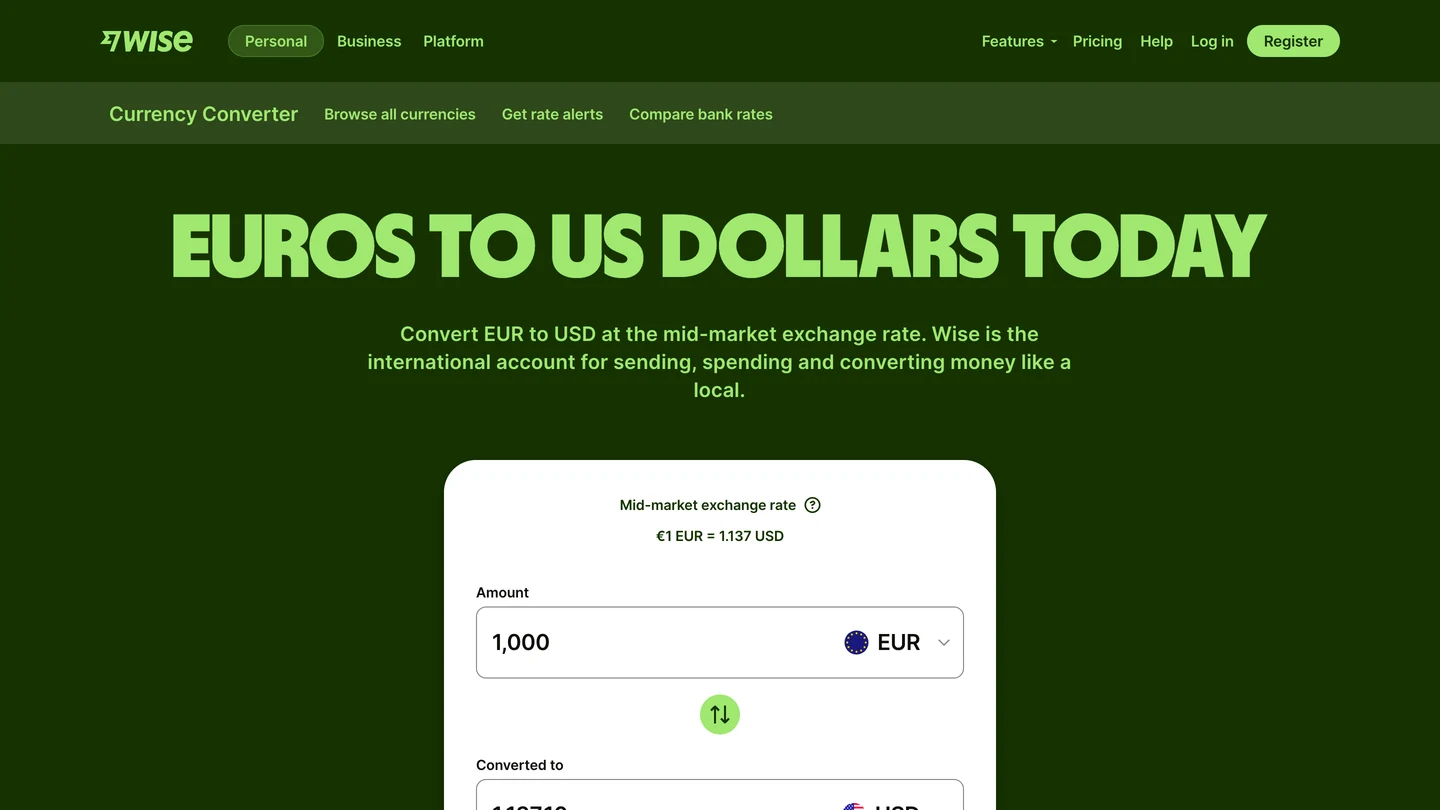
The answer, today's rate, is the first thing you see. Right under it is a working converter, so you can type your own amount.
You don't have to scroll or read to get what you came for. That's why people stay, and why Google keeps the page at the top.
Our free browser extension checks the SEO side in one click. Open the page, click the UNmiss icon, and a panel opens beside it.
It runs 35 SEO checks and scores this page 82 out of 100, with no critical problems.
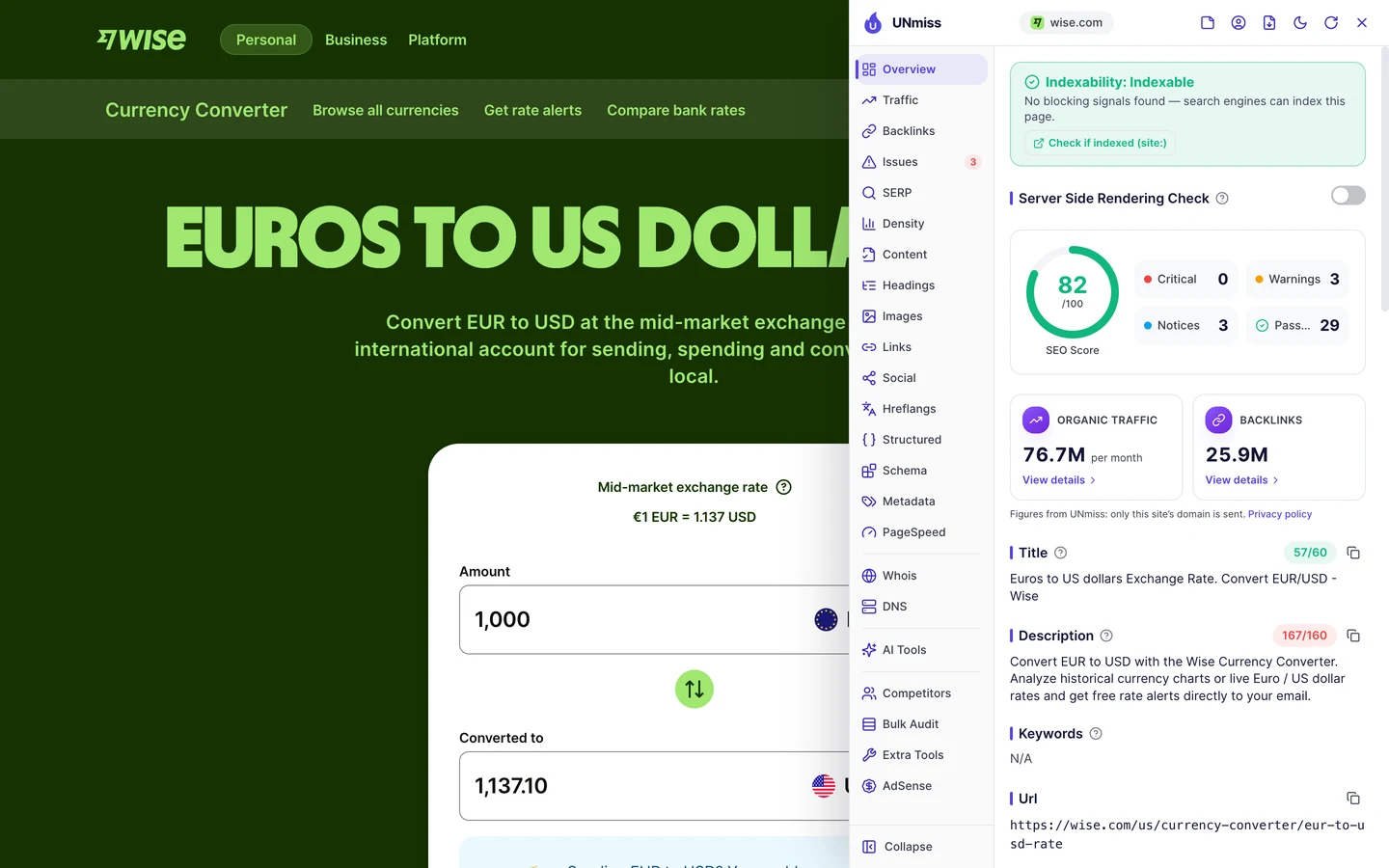
So if you build a tool page, put the answer and the tool first. Keep the helpful text below it, for the people who want more.
Wise turned one converter into thousands of pages, one for each question people search. We build tools and template pages like that, from your own data, so every page answers a real search.
- We find the searches your data can answer
- We design one template with the answer at the top
- We build the pages and keep them fresh
- SEO and GEO, so AI answers can quote them too
Win every way people type it
You and your customers don't all search the same way. One person types "eur in usd", another types "euro in us dollars", and a third types "eur to dollars".
The Keywords tab of our Website Audit lists every search a site ranks for, where it ranks and how many visits each one sends.
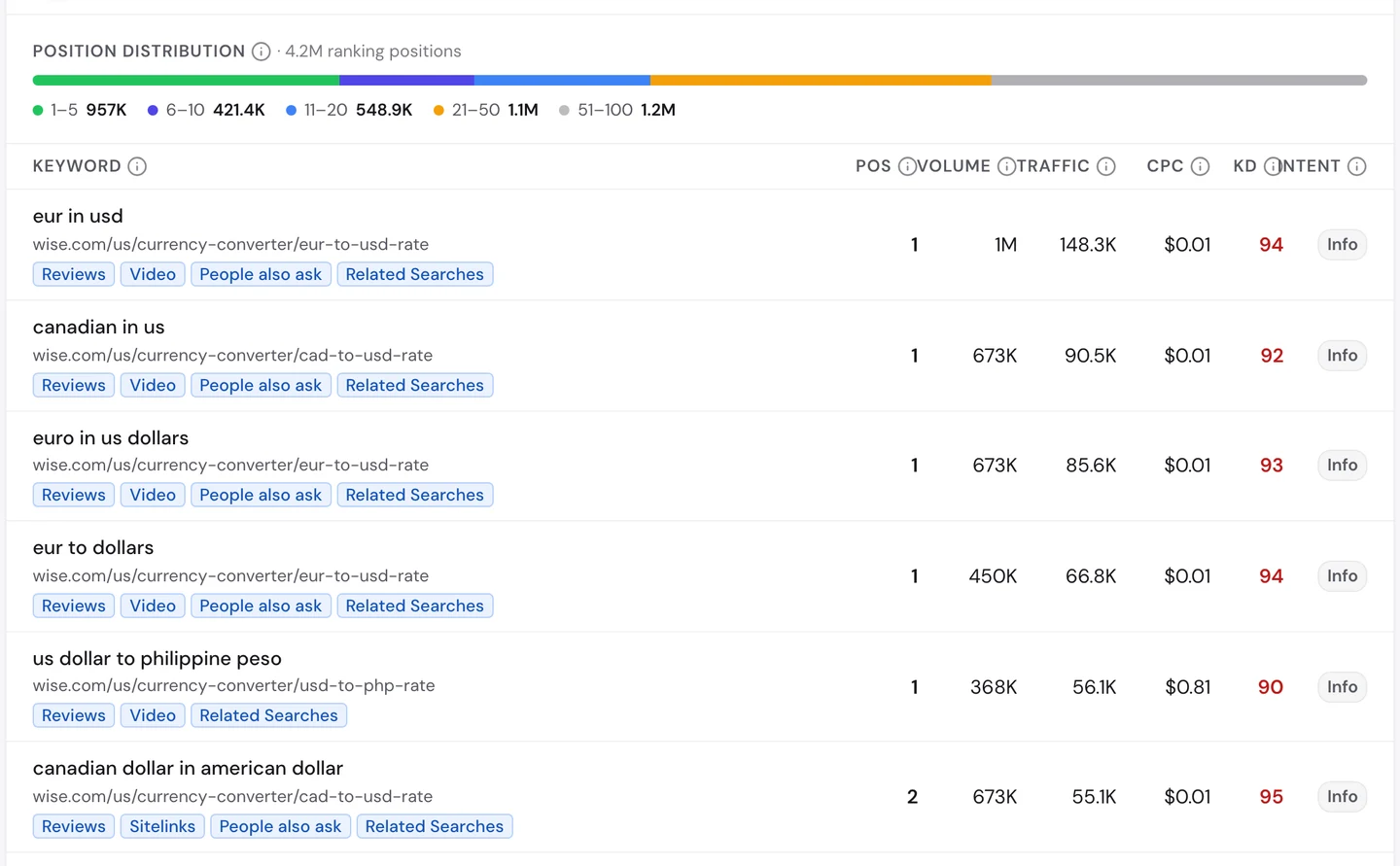
All 3 of those searches land on the same Wise page, and it ranks first for each. "Eur in usd" alone is searched about 1M times a month.
So you don't need a new page for every spelling. Make one strong page and let it win all the ways people ask.
The Competitors tab shows who else wants those searches.
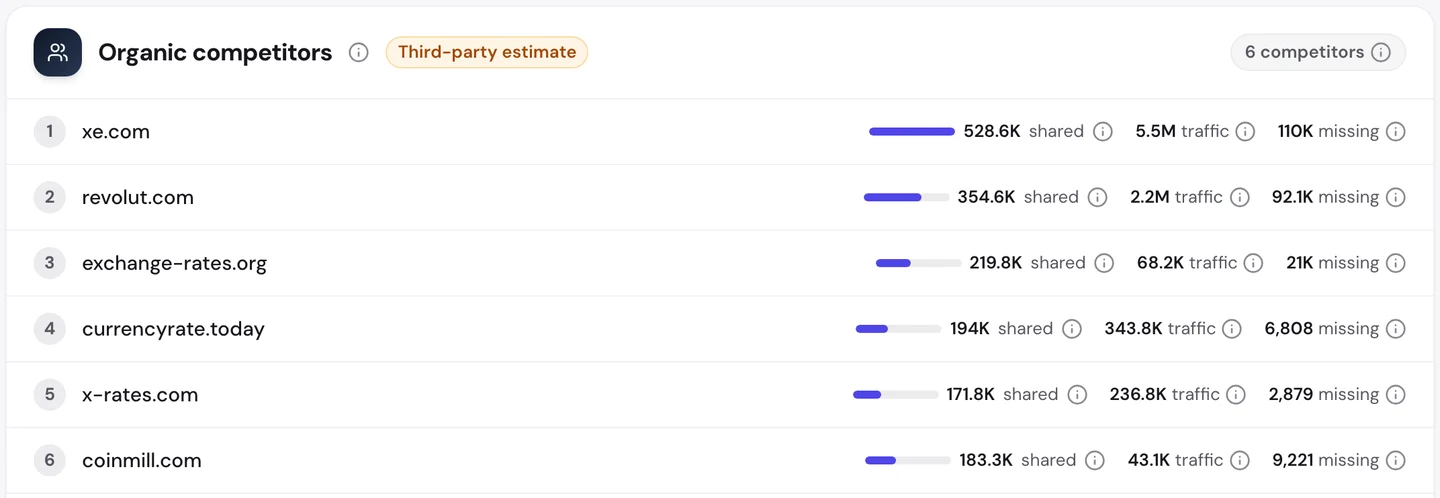
XE, another currency site, shares about 530K searches with Wise. Revolut, a money app like Wise, comes next.
You can do the same check. Look up every way people ask your question with our Keyword Research tool, then answer them all on one page.
Speak every reader's language
The US is only part of the story. The Traffic tab of the same audit shows Wise's visits worldwide.
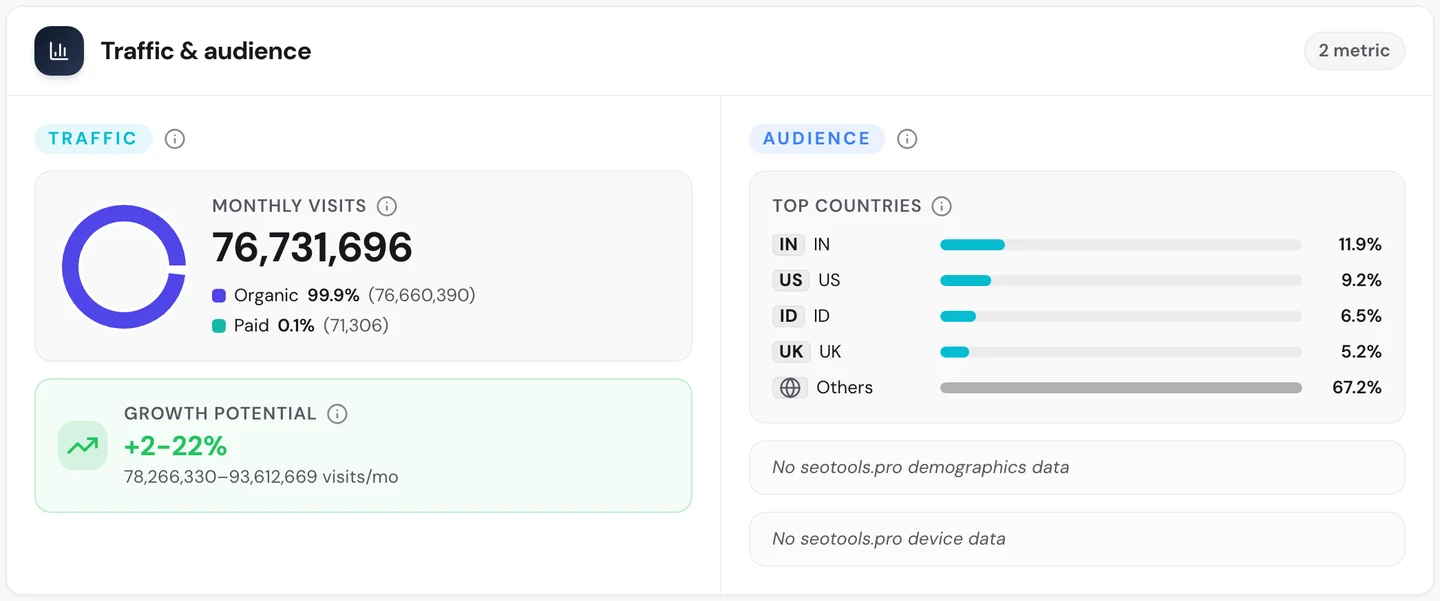
That's about 77M search visits a month. India sends the most, and the US sends fewer than 1 in 10.
Wise gets there by copying each page into many languages and countries. Our extension's Hreflangs tab shows how.
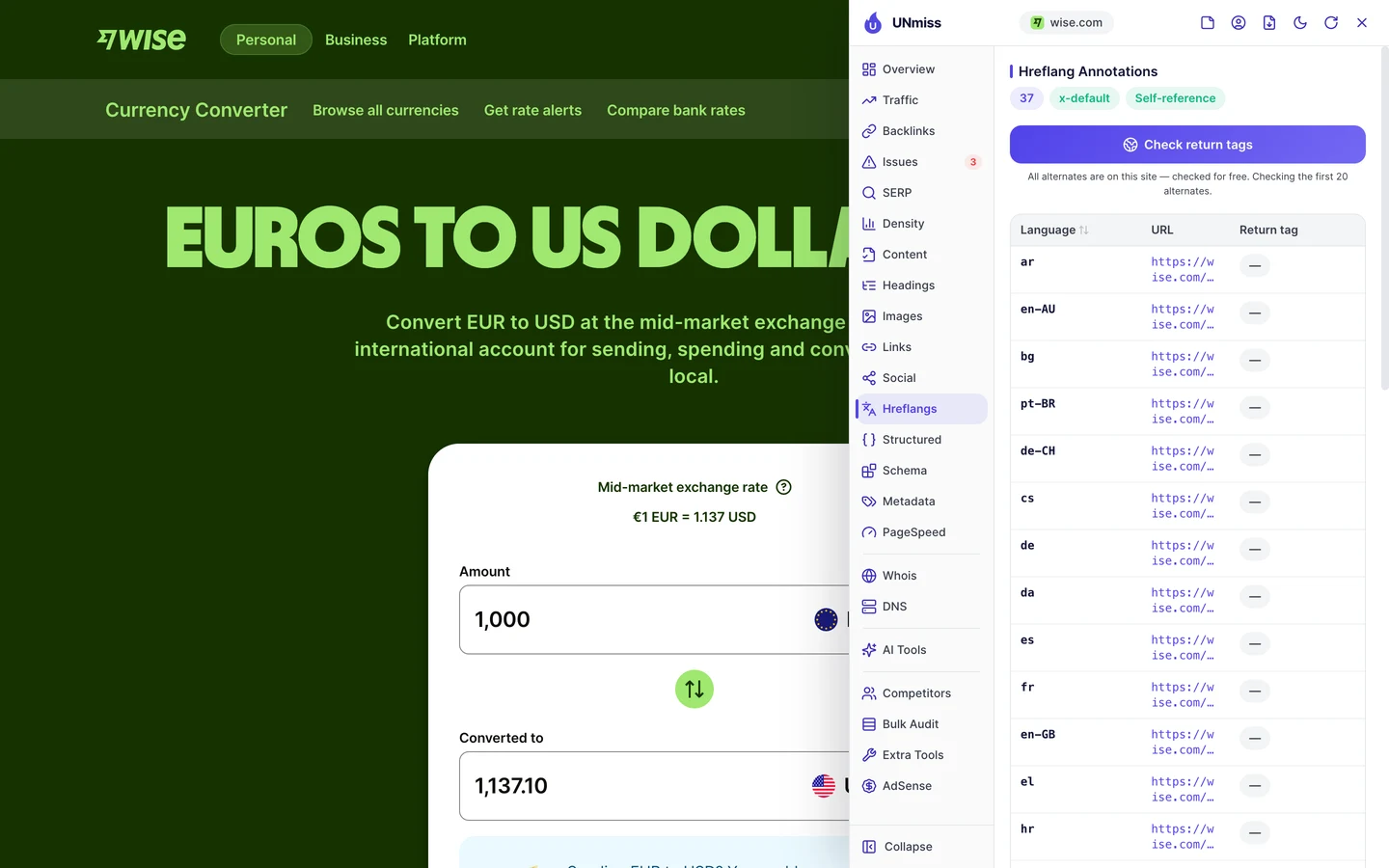
Hreflang is a tag that tells Google which language each version is in, so it can show the right one. The euro page has 37 versions, from Arabic to Croatian.
IKEA, which we studied for the same reason, does this in more than 100 countries.
The audit still found a few slips. On 3 pages, a version uses a language code Google doesn't know, and a few more are missing their links back.
So if you translate your pages, check your tags as well. Each version you publish should list itself and all the others.
Let customers earn your links
A backlink is a link from another website to yours. Google treats each one a bit like a vote of trust.
The Backlinks tab of our audit shows the same data as our Backlink Analyzer.
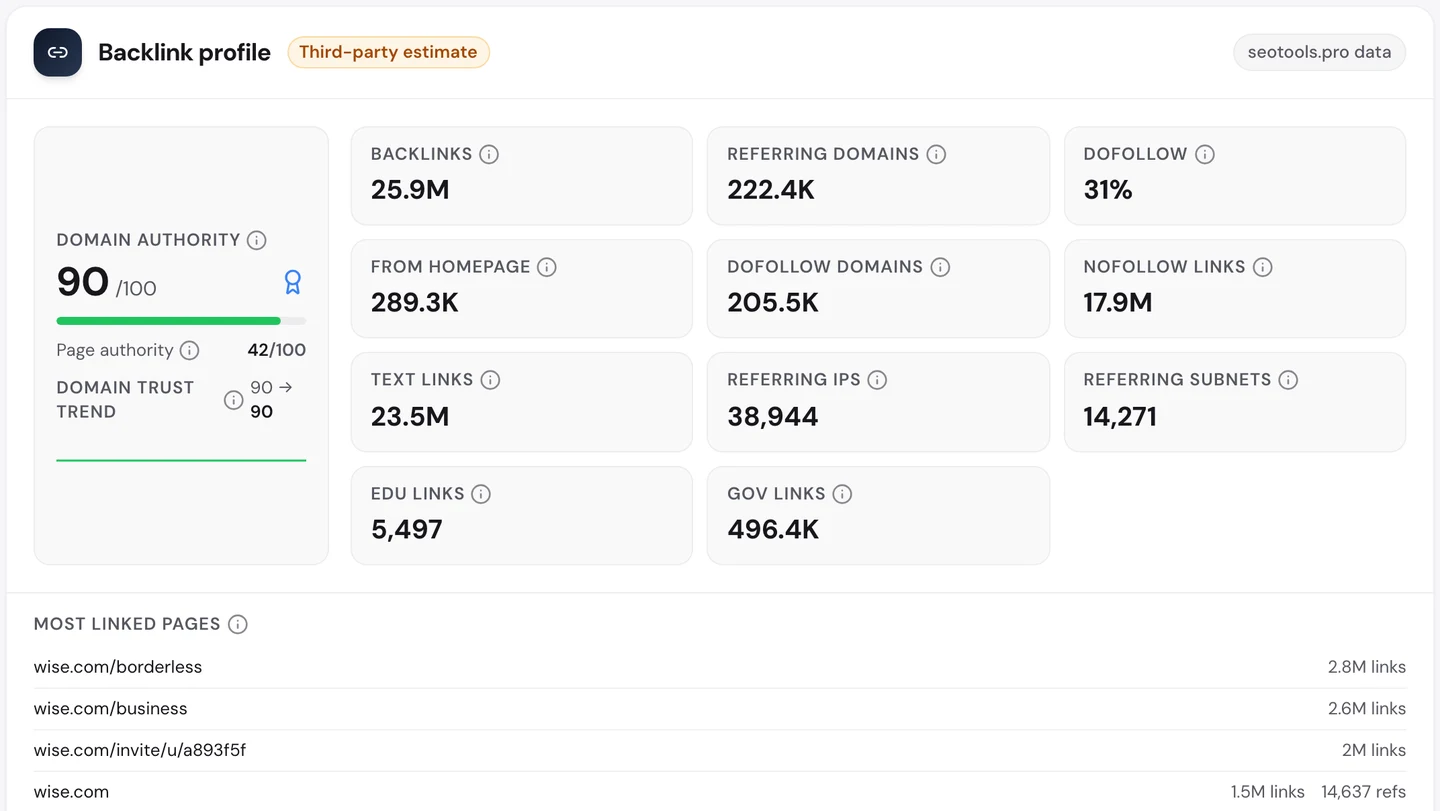
Wise has about 26M links from more than 200K websites. Look at the list of most linked pages, though.
The third one is a single customer's invite link, with about 2M links. People share their invite links to earn a reward, and every share is a link back to Wise.
The top one is wise.com/borderless, the old name of Wise's account. When Wise renamed it, the old address was redirected to the new page, so those links still count.
Wise did the same when it moved from TransferWise to wise.com in 2021.
So give customers a reason to share a link, like an invite reward. And when you rename a page, always point the old address to the new one.
Audit what every template repeats
With millions of pages built from a few templates, one mistake spreads fast. So we checked Wise with our Website Audit.
It crawls a site the way Google does. It opens each page, follows the links to the next ones, and tests every page against a long list of checks.
We had it crawl 250 pages. Wise scored 84 out of 100, which the report rates as good.
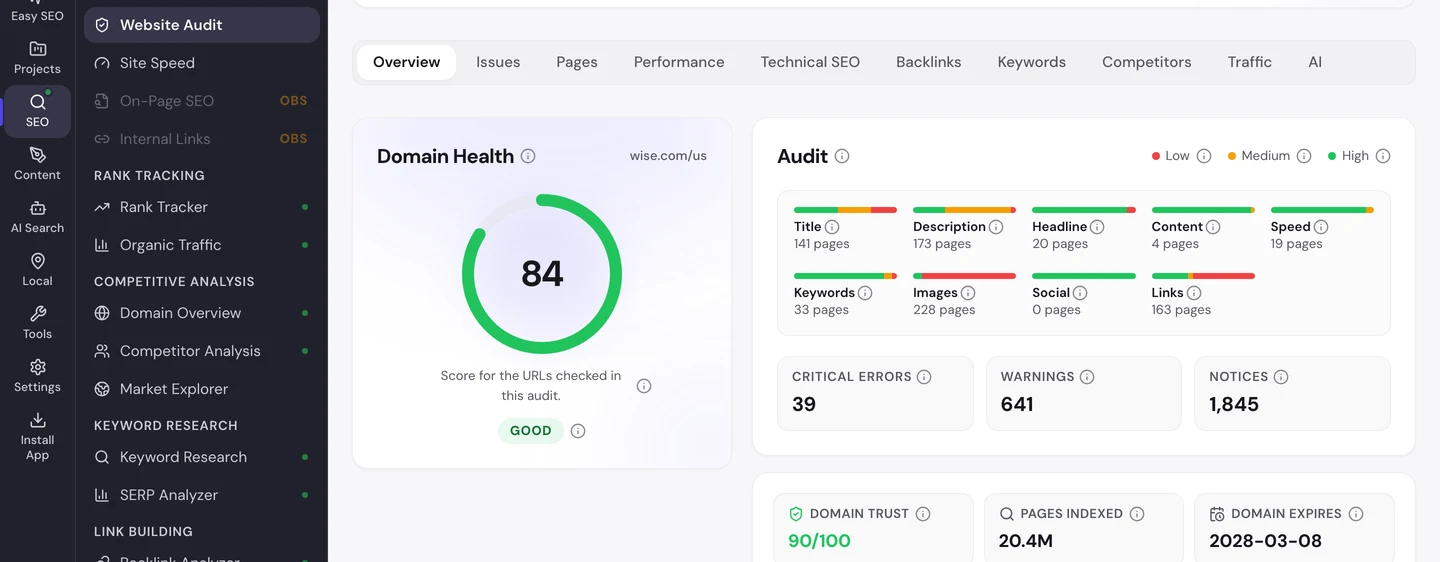
The Issues tab sorts the problems by how much they matter.
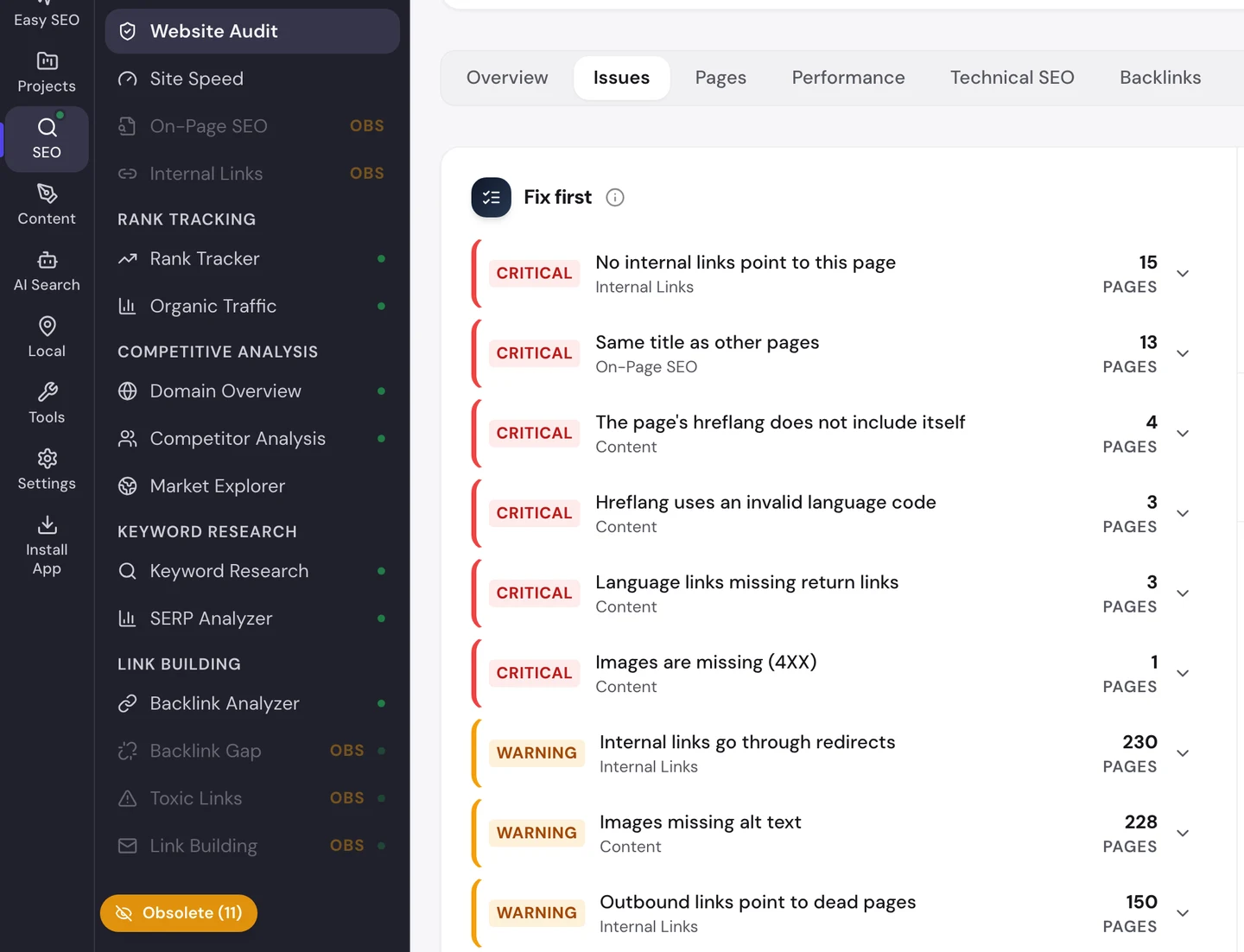
The biggest warnings sit on almost every page. Links go through redirects, and images have no alt text, a short description that tells Google and screen readers what a picture shows.
The Technical SEO tab finds pages that repeat each other.
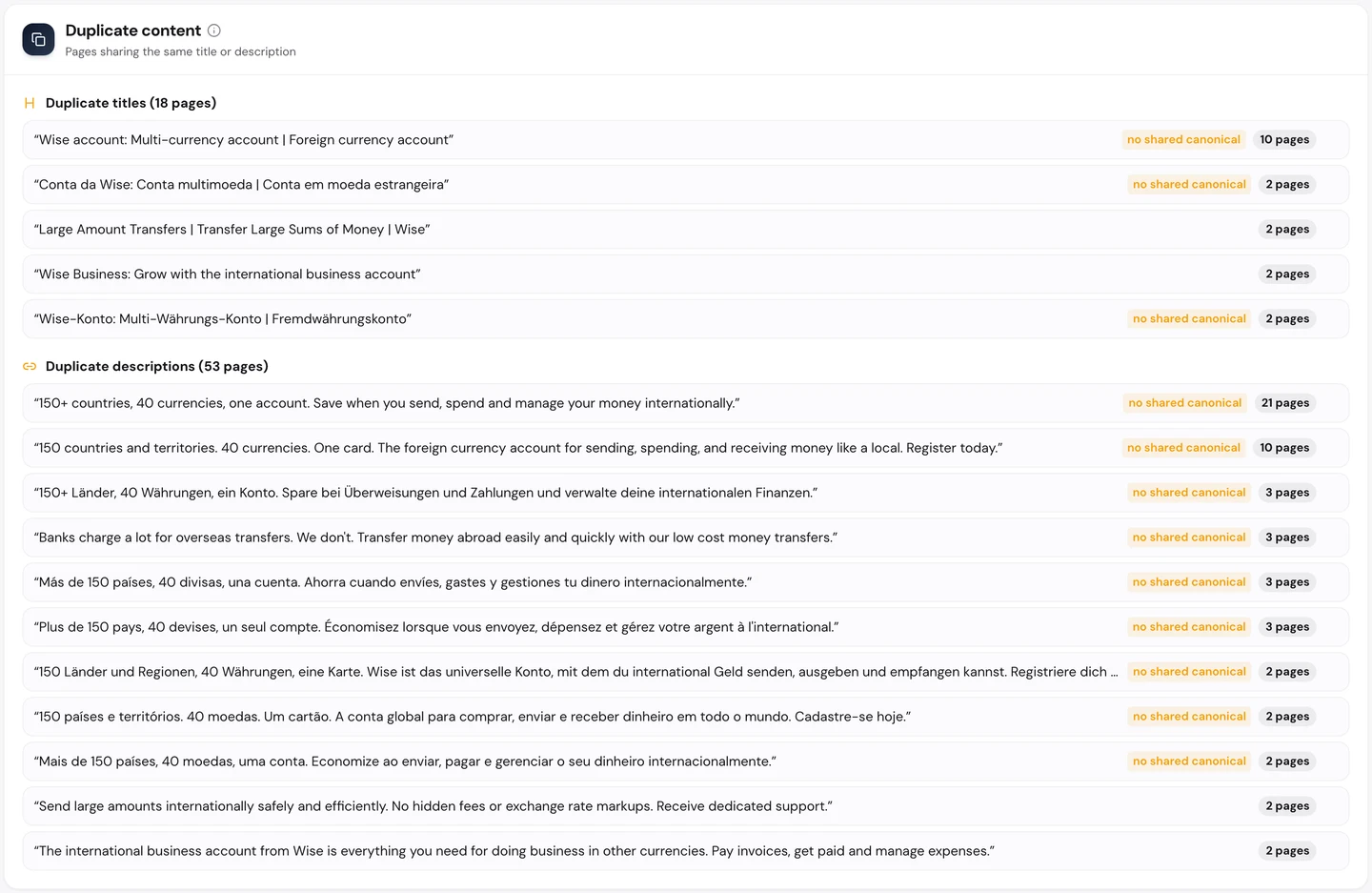
One account title is used on 10 pages, and one description is reused on 21. Google has a harder time telling those pages apart.
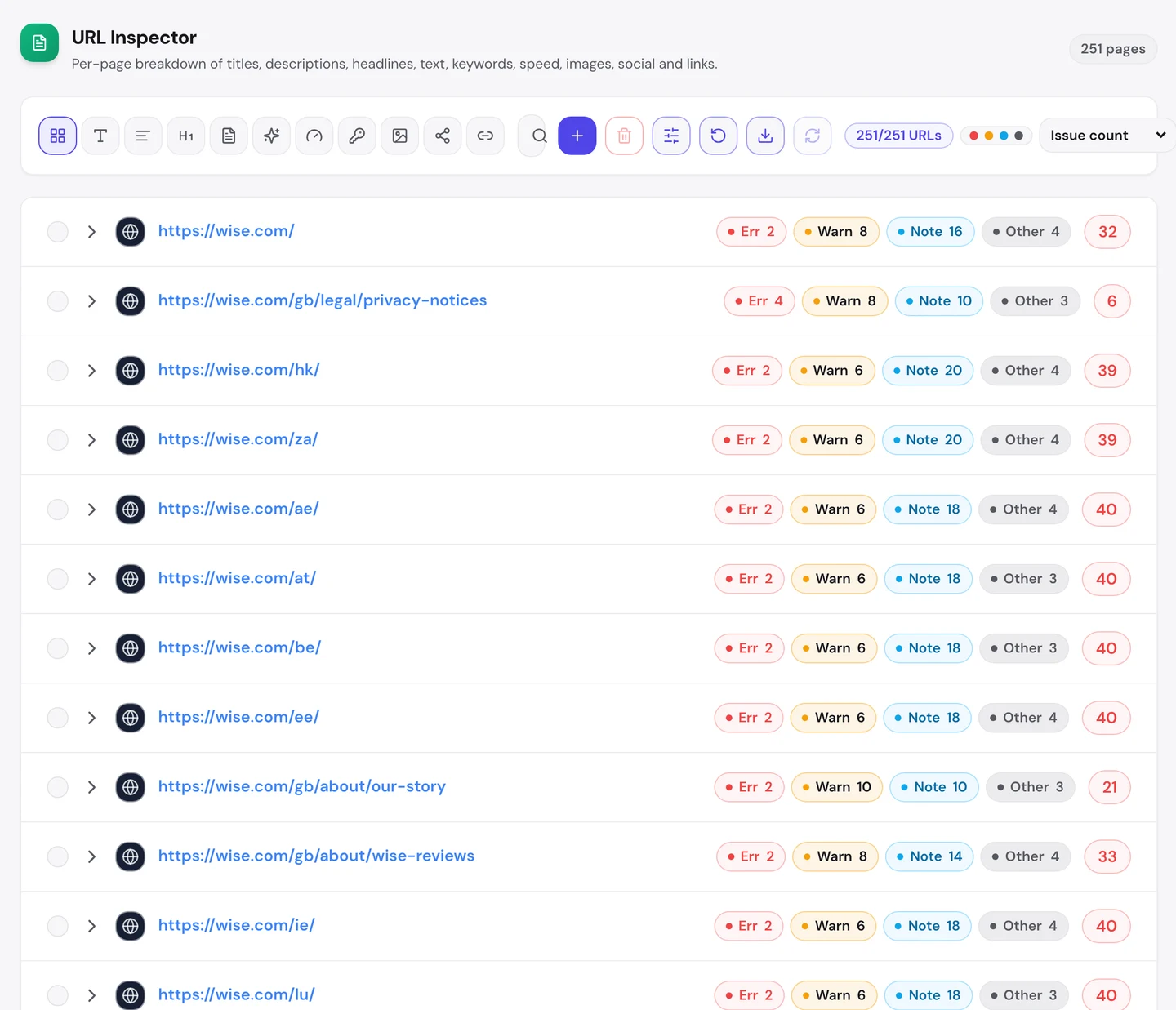
The Pages tab shows the same pattern page by page. Wise's country homepages, for Hong Kong, South Africa, Austria and more, all score about 40 with the same 2 errors.
Our extension finds the same kind of problem on the converter itself.
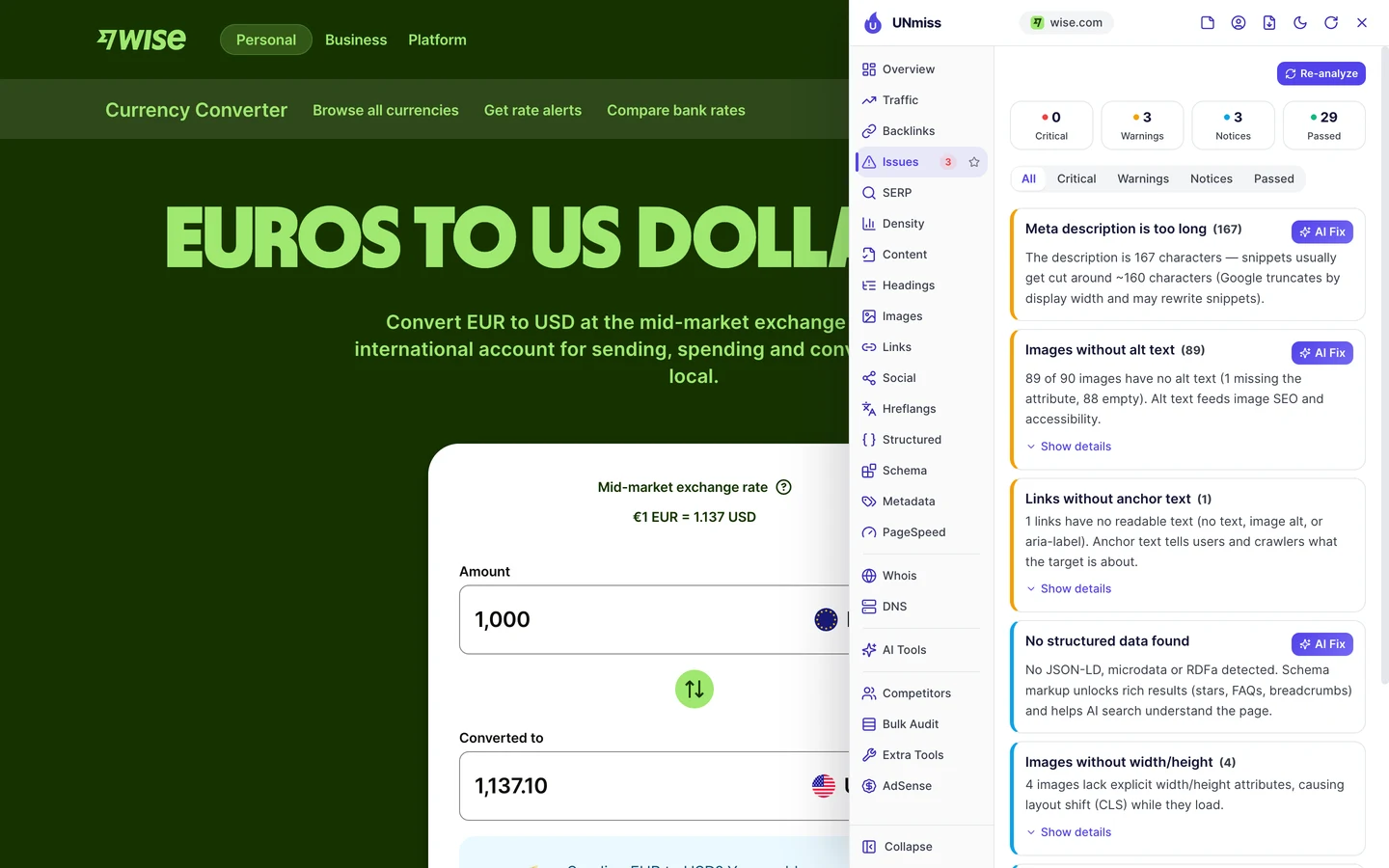
89 of its 90 images have no alt text. And the page has no structured data, code that tells Google what a page is.
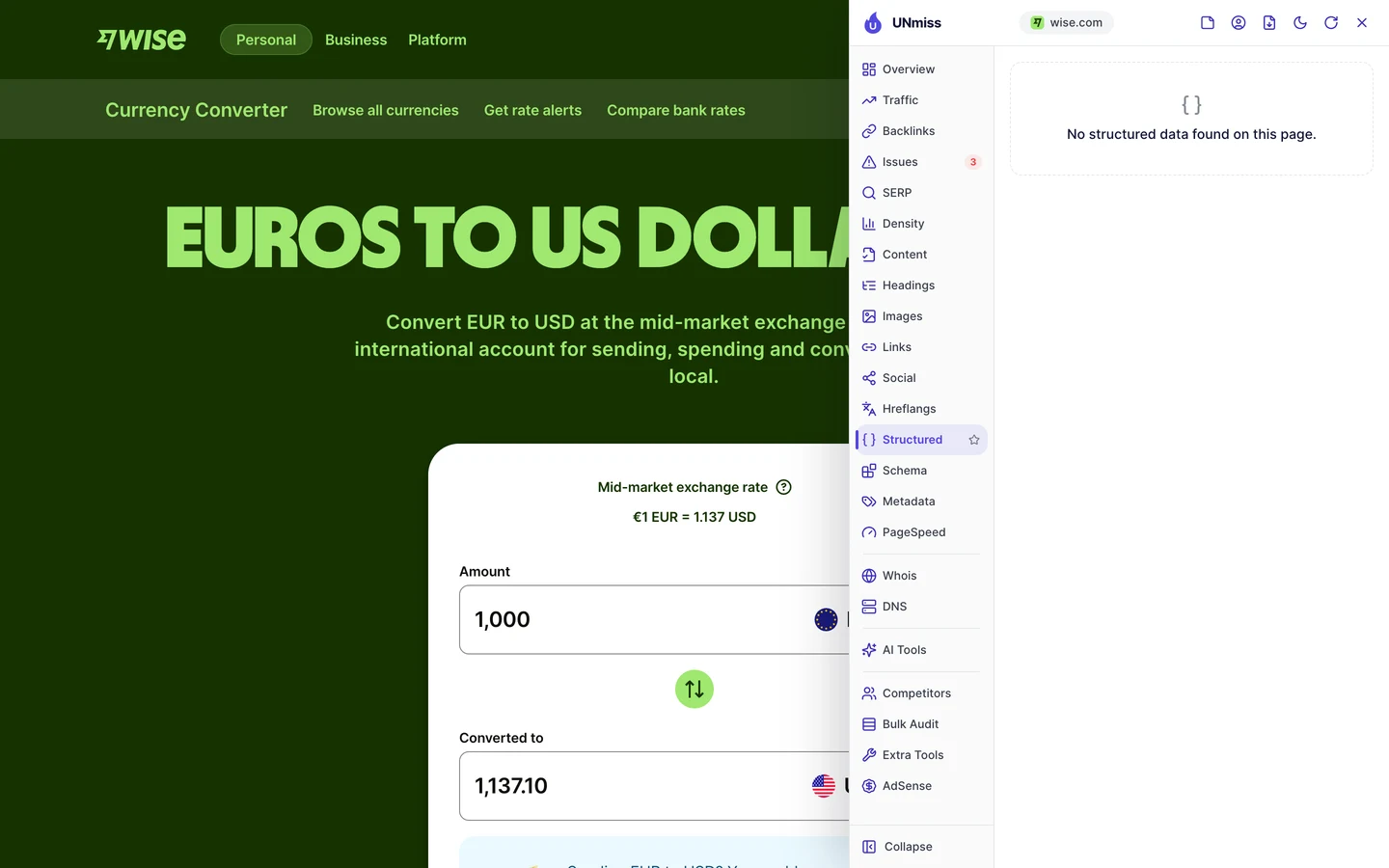
These are all template fixes. If you fix the template once, every page you built from it gets better.
You can write the missing code with our Schema Markup Generator, and tighten titles and descriptions with our Meta Tag Generator.
You don't have to work out the order yourself. The audit's AI tab writes the plan: a short summary, each problem with how to fix it, and a 90-day to-do list.
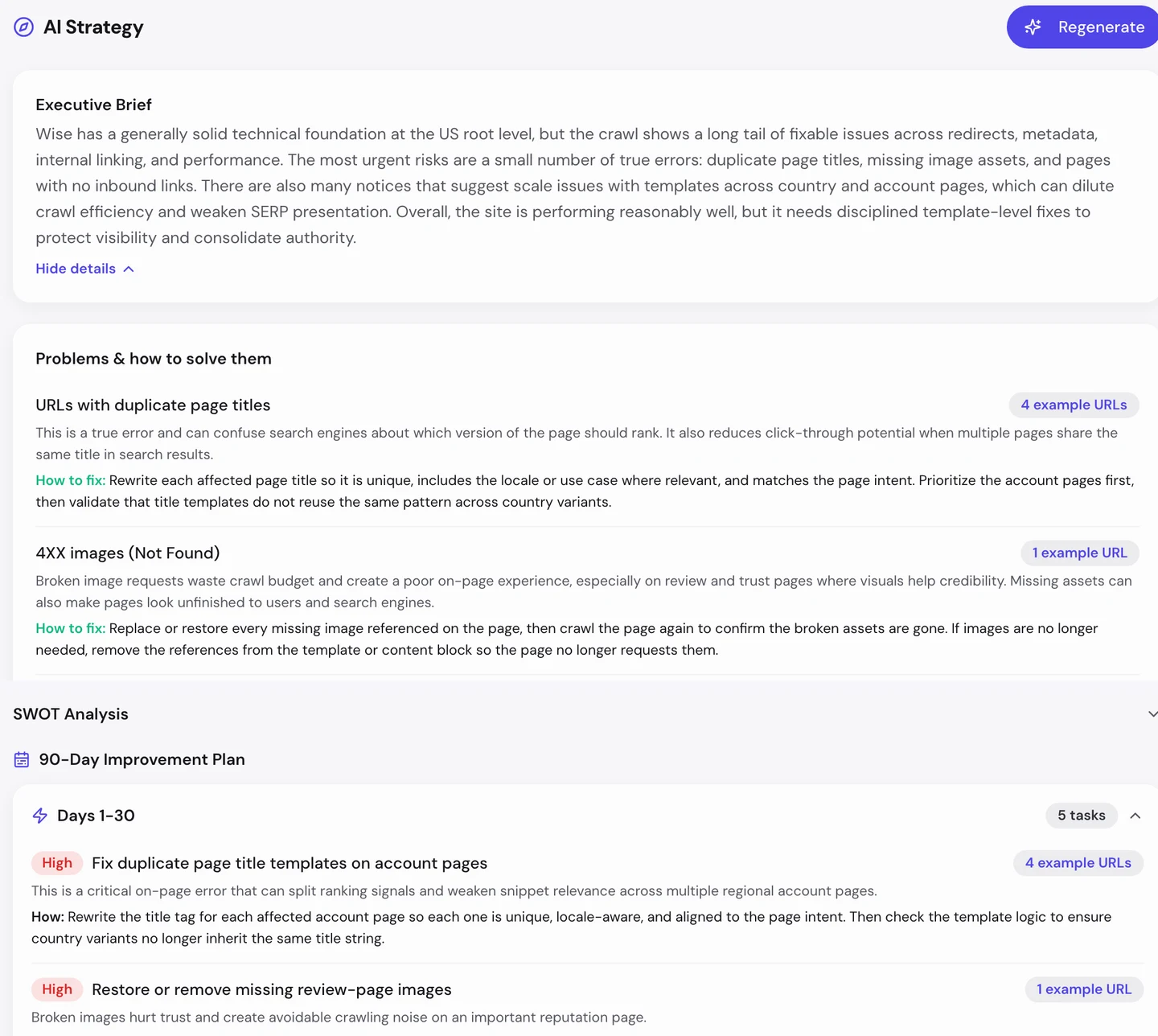
For Wise, the first month goes to unique titles on the account pages and the missing images on its reviews page.
Make taps fast on phones
The Performance tab of the audit shows Core Web Vitals. These are Google's 3 checks of how fast a page loads, how fast it reacts and whether it stays still, measured on real visitors' devices.
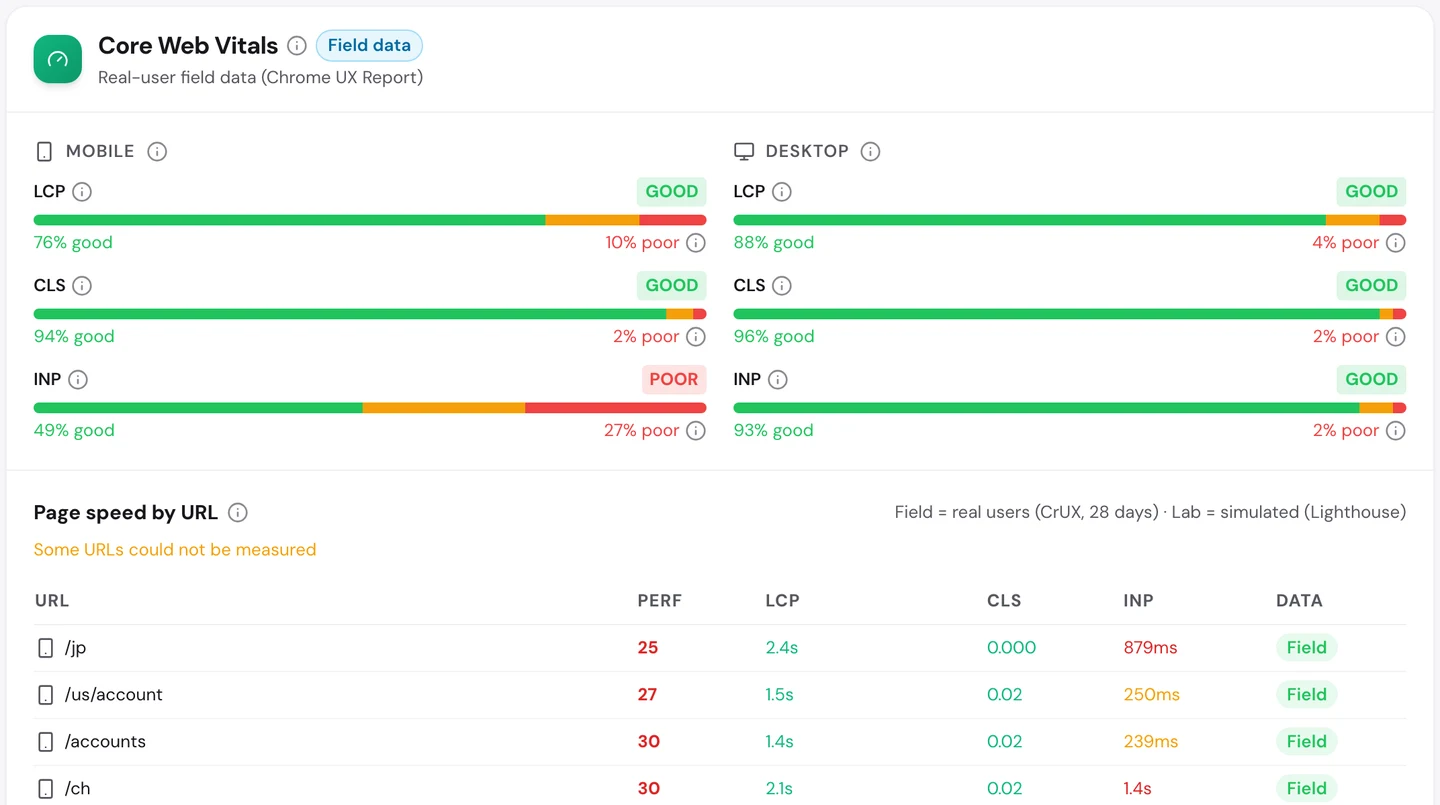
On desktops, Wise passes all 3. On phones, it fails one: how fast the page reacts when you tap.
Only about half of phone taps get a quick response. That matters on a converter, where the whole point is to type and tap.
So test your key pages on a phone, not just a laptop. Our Site Speed tool shows what slows each page down.
Watch your trend line
Go back to the traffic chart in the first lesson. Wise climbed to about 9M US visits a month early this year, then dropped to about 7M in June.
Our Domain Overview shows the same story from the keyword side.
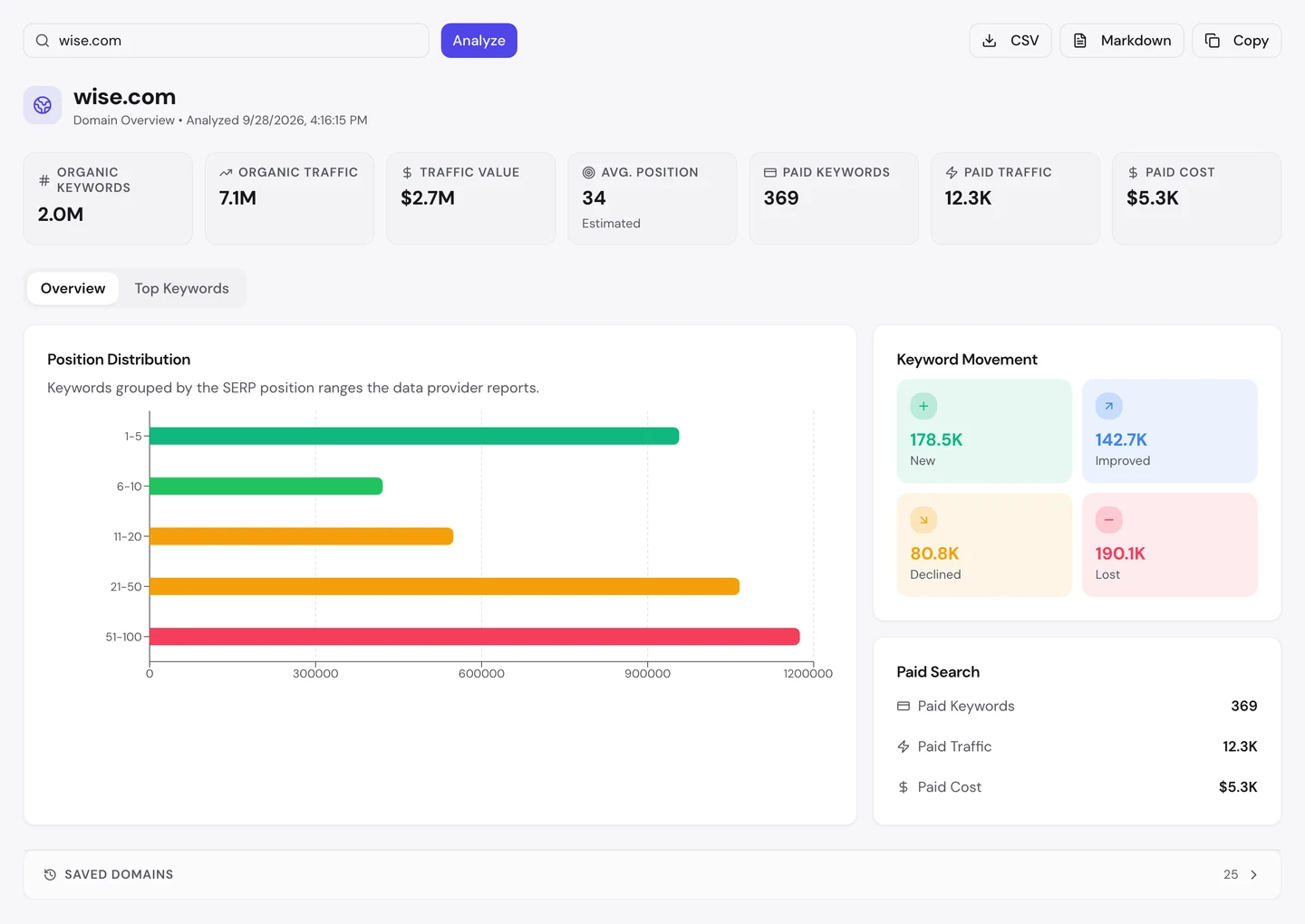
More of Wise's keywords were lost than new ones gained. When that happens, visits usually fall with them.
A drop like this can come from a Google update, a new rival or a change on your own site. You can only find the cause if you spot it early.
So track your most important searches in our Rank Tracker. You'll see a slide in days, not months.
Let AI tools read your pages
More and more people now ask ChatGPT or Claude before they ask Google. So we checked which AI tools may read Wise.
Those tools send crawlers, programs that visit pages and read them. The rules for them live in robots.txt, a file that tells crawlers what they may read, and our extension reads it for you.
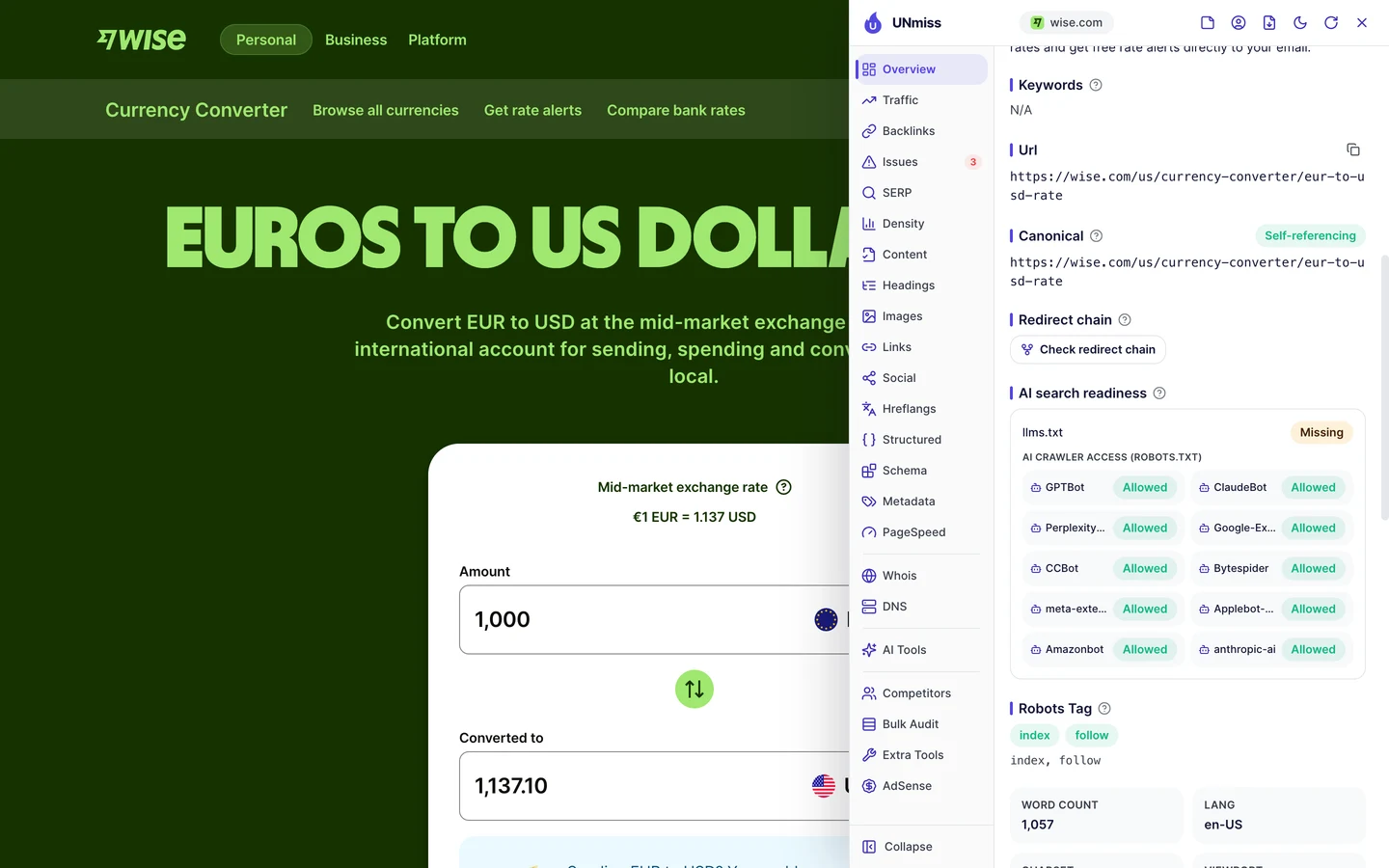
Wise lets every AI crawler in. That means AI tools can read its rates and quote Wise when people ask about money transfers.
Healthline, the health site we also studied, made the opposite choice and blocks most of them.
Neither choice is wrong, as long as you make it on purpose.
Write your rules with our robots.txt generator, then check whether AI tools mention you with our AI Visibility Checker.
All 10 of Wise's top pages come from one template. Our Organic Traffic Checker shows your top pages and the share each one brings, so you can see which kind of page is working for you.
- The same report that measured Wise
- Each top page's traffic, share and top search
- Run it on any rival's domain too
What you cannot copy
First, the part you can't copy: Wise's product.
Its converter shows a real rate because Wise moves real money every day. And millions of customers share invite links because they already like it.
A new site can still copy the idea. Pick one useful tool, build a page for each version of the question, and make the answer the first thing people see.
Now a few honest notes on the numbers.
We took most of our figures on 28 September 2026, and the sitemap count in August. The 7.1M figure counts US searches, and the 77M worldwide figure comes from the audit's Traffic tab.
Both are estimates. Nobody outside Wise can count its real visits, so tools work them out from rankings and search volume.
We set the crawl to 250 pages, a sample of a very big site. So we used it to find problems that repeat, not to count every error.
The one number to take away
1%.
That's the share of Wise's US search visits that come from people typing its name. Almost everyone else arrives with a question, like "how much is a euro in dollars?", and a free tool answers it.
That's the lesson for any business. Find the question your product answers, and build the page that answers it best.
Know a question your customers ask with numbers in it? That could be your first tool page.
You can run every one of these checks on your own site, and on your rivals', and see the same numbers for yourself.
Frequently asked questions
Will Google punish me for making many similar pages?
Not if each page answers a different question with its own useful data. Google pushes down pages that only swap one word and add nothing. The test is simple: would someone be glad they landed on this page?
How many template pages should I start with?
Start small, with the 20 to 50 versions people search most. Watch which ones get indexed and visited, then add more. Launching thousands at once makes problems hard to spot.
Do I need a developer to build a tool page?
For a live tool, usually yes. But a simple calculator or lookup table can be built with ready-made widgets or no-code tools. Start with the simplest version that answers the question.
How do I keep data on thousands of pages up to date?
Pull it from one source, like a database or a data feed, so one update changes every page. Never copy data by hand into each page, because it goes stale fast.
Do referral links count as real backlinks?
They can, if people post them on their own sites and social pages. Google may treat links that are paid for or traded differently. A reward for sharing is fine, but don't pay for links on other sites.
Should I translate every page into other languages?
Only for the countries you actually serve. A translated page needs real support, pricing and payment options behind it. Start with your biggest market after your home country.
How long do template pages take to rank?
Usually a few weeks to a few months on an established site. A new site can take longer, because Google crawls it less often. Linking to the new pages from your main pages helps.
Does changing my domain name hurt SEO?
It can for a few weeks. Redirect every old page to its matching new page, not just to the homepage, and keep those redirects for at least a year. Then tell Google about the move in Search Console.